

Small Victories Monarch Budget Model 03
Model 02 sorts spending by how money behaves, across five groups and about thirty categories. It works well, but it’s a lot to set up if you’ve never kept a budget, or if you just want one number to check each month.
Model 03 is the lighter version. There are three groups, and every expense answers one question: is this a need, a want, or my future?
Start with a split you can remember
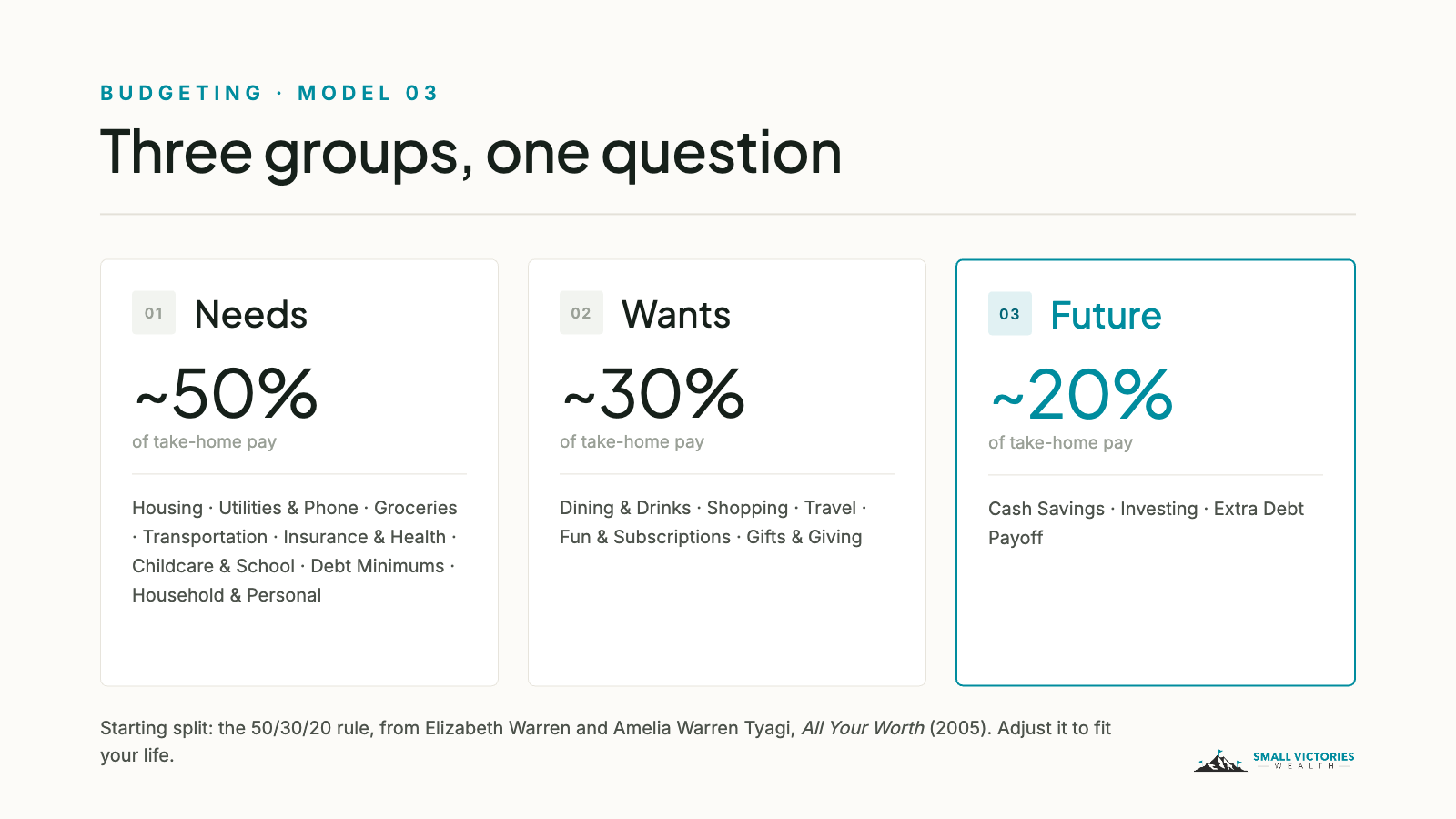
You’ve probably heard of the 50/30/20 rule. It comes from Elizabeth Warren and Amelia Warren Tyagi’s book All Your Worth: about half of take-home pay goes to needs, about a third to wants, and the rest to savings and paying down debt.
The exact numbers matter less than the habit. Those three percentages give you a quick gut check each month without opening a single category. If Needs keeps creeping up, you’ll see it. If Future slips, you’ll see that too.
A quick note for the Bay Area: rent or a mortgage plus daycare can take well over half of take-home pay. That doesn’t mean the budget is broken. Start with a split that fits your life, like 60/20/20, and watch which way it moves over time.
The three groups
Here’s the layout, with the categories inside each group:
Needs: Housing · Utilities & Phone · Groceries · Transportation · Insurance & Health · Childcare & School · Debt Minimums · Household & Personal
Wants: Dining & Drinks · Shopping · Travel · Fun & Subscriptions · Gifts & Giving
Future: Cash Savings · Investing · Extra Debt Payoff
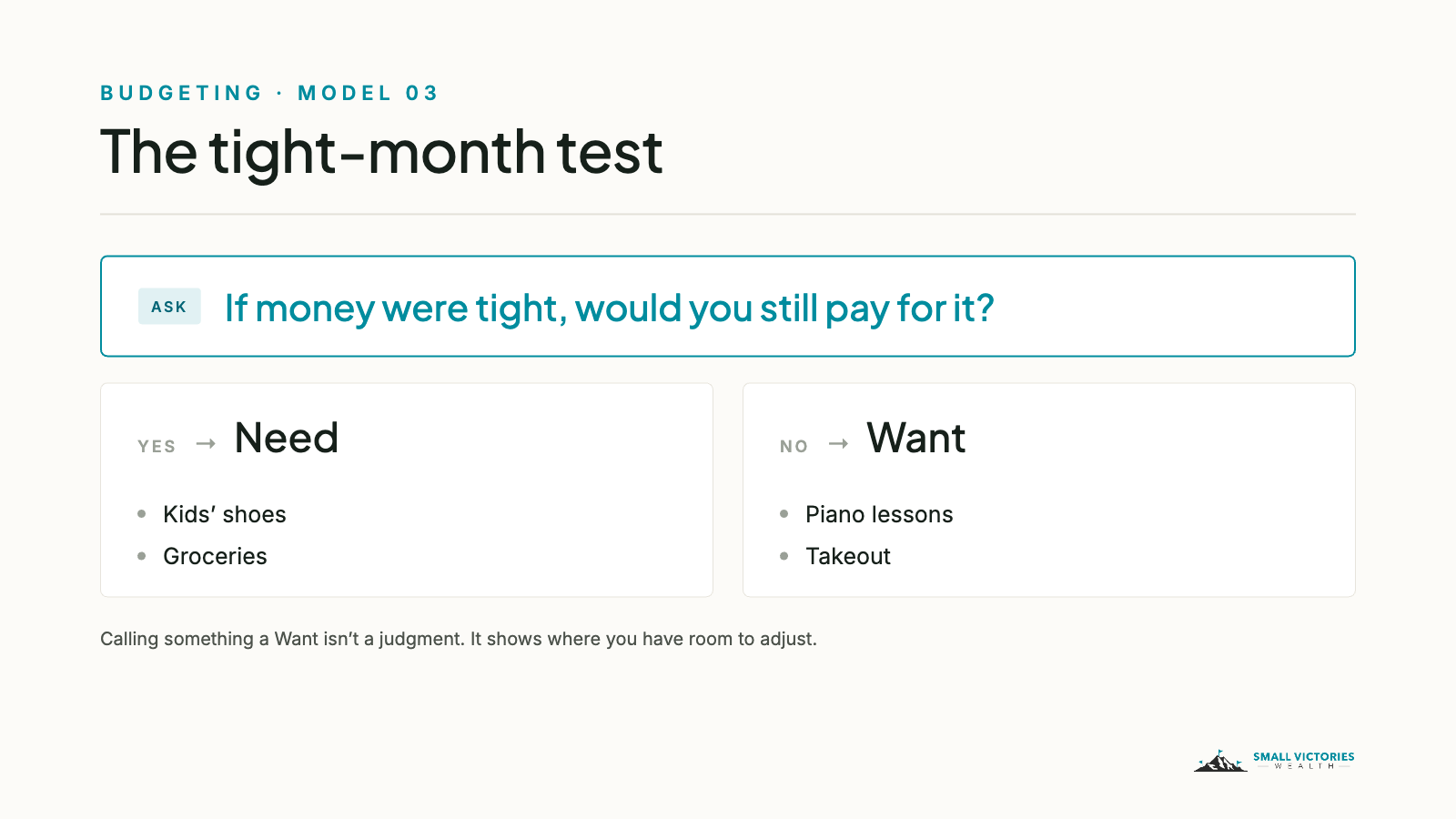
When you’re not sure where something goes, use the tight-month test: if money were tight, would you still pay for it? If you would, it’s a Need. If you wouldn’t, it’s a Want. Kids’ shoes are a Need. The third pair of sneakers is a Want. Piano lessons are a Want too, and that’s fine. Calling something a Want isn’t a judgment. It just tells you where you have room to adjust when you need it.
Income and transfers: set these up once
Income gets three categories: Paychecks, Bonus & Equity, and Other Income. Keeping bonuses and RSU sales out of Paychecks means a big month doesn’t set the bar for every month after it. Plan on sending most of that money to Future.
Transfers trip up almost everyone, so here are two rules:
Credit card payments are always a Transfer. You already categorized the purchases when they posted. Counting the payment too would count that spending twice.
Savings get counted when they leave checking. When money moves from checking to savings or an investment account, the withdrawal from checking gets a Future category and the deposit on the other end is a Transfer. That’s how your savings show up in the budget.
A heads-up on 401(k) and HSA contributions: they come out of your paycheck before it lands, so Monarch never sees them, and your Future number will look lower than your real savings rate. We add those back by hand when we review a budget together.
Tags: six, and only six
Model 03 uses the same tag format as our tags post: a short prefix, a colon, and then the specific thing.
Trip: for anything with travel dates, like Trip: Tahoe 2026
Proj: for a one-time effort with an end, like Proj: Nursery 2026
Reimb: for anything someone will pay you back, like Reimb: Work or Reimb: FSA
Tax: for the things your tax preparer will ask about, like Tax: Deductible
Kid: for per-child totals, like Kid: Maya (optional)
Split: for costs you’ll split with a partner or co-parent (optional)
Here’s a trick for Reimb:. Tag the original charge and the reimbursement when it arrives. When the tag’s total gets back to zero, you’ve been paid back in full.
Where families get stuck
A few snags come up in almost every household we work with:
Yours, mine, and ours accounts. Moving money into a joint account is a Transfer, not income or spending. Link everyone’s accounts to one Monarch household so nothing gets counted twice.
Mixed carts. A Costco run holds groceries, diapers, and a patio chair. Split the transaction only if the smaller part is more than about $50. Close enough is the goal.
FSA and HSA reimbursements. Categorize the reimbursement to the same category as the original cost so they cancel out, rather than letting it show up as income.
Lumpy costs. Summer camp, holiday travel, and annual premiums stay in their usual categories. Set them to Non-monthly in Monarch’s Flex budgeting and turn on rollover.
One person does all the work. Keep the categories few, have one person handle the weekly cleanup, and look at the three groups together once a month.
Where to start
Set up the three groups, move your existing categories into them, and check your split at the end of the month. Don’t worry about tags until a question comes up that a category can’t answer.
If you’ve outgrown this layout, or you have rentals or a business to track, Model 02 is the next step up.
Want help setting this up in your own Monarch account? Book a short intro call.
On Monarch: Monarch is a budgeting app we use with clients to connect accounts and track spending. Small Victories Wealth receives no compensation from Monarch — no referral fees, no affiliate arrangement, no revenue share. Clients in our ongoing planning services get Monarch access as part of their fee; for our budget packages and Budget Support, you keep your own Monarch subscription. It's one tool among several, and it may not be the right fit for every situation.
